Customer Relationship Management (CRM) software has become an essential tool for businesses that want to manage leads, improve customer relationships, and increase sales. Among the many CRM solutions available today, Pipedrive CRM has built a strong reputation for its simplicity, visual sales pipeline, and sales-focused approach.
Unlike enterprise CRMs that often overwhelm users with unnecessary features, Pipedrive focuses on helping sales teams organize deals, automate repetitive tasks, and close more opportunities. It is designed primarily for sales professionals, startups, small businesses, and growing organizations that need an intuitive platform without a steep learning curve.
In this detailed review, we’ll explore Pipedrive CRM’s performance, pricing, features, advantages, disadvantages, and whether it’s worth investing in for your business.
What is Pipedrive CRM?
Pipedrive CRM is a cloud-based sales CRM developed specifically for sales teams. It allows businesses to organize leads, track deals through customizable sales pipelines, automate workflows, manage contacts, schedule activities, and generate insightful reports.
The platform was created around one simple idea: salespeople should spend more time selling and less time managing spreadsheets.
Today, thousands of businesses worldwide use Pipedrive to streamline their sales process and improve productivity. The platform has also expanded its capabilities by introducing AI-powered features, workflow automation, and hundreds of third-party integrations. Current plans include Lite, Growth, Premium, and Ultimate, with optional add-ons for lead generation and other advanced capabilities.
Quick Overview
| Feature | Rating |
|---|---|
| Ease of Use | ⭐⭐⭐⭐⭐ |
| Sales Pipeline | ⭐⭐⭐⭐⭐ |
| Automation | ⭐⭐⭐⭐☆ |
| Reporting | ⭐⭐⭐⭐☆ |
| Integrations | ⭐⭐⭐⭐⭐ |
| Mobile App | ⭐⭐⭐⭐⭐ |
| Customer Support | ⭐⭐⭐⭐☆ |
| Overall Value | ⭐⭐⭐⭐⭐ |
User Interface and Ease of Use
One of Pipedrive’s biggest strengths is its user-friendly interface.
Many CRM platforms require weeks of training before employees become comfortable using them. Pipedrive is different.
Everything is organized logically, making navigation simple even for first-time users.
The dashboard is clean and uncluttered.
Users can quickly access:
- Sales pipelines
- Contacts
- Deals
- Activities
- Calendar
- Reports
- Email inbox
- Automation tools
The drag-and-drop interface allows sales representatives to move deals between stages with a single click.
This simplicity significantly reduces onboarding time.
Performance and Speed
Performance is one of the reasons businesses choose Pipedrive.
The platform loads quickly, even when handling thousands of contacts and deals.
Common actions like:
- Opening customer profiles
- Updating deals
- Creating activities
- Sending emails
- Searching contacts
are completed almost instantly.
Because it is cloud-based, users can access their CRM from anywhere without worrying about software installation or hardware requirements.
The mobile application also performs exceptionally well, making it ideal for field sales representatives.
Sales Pipeline Management
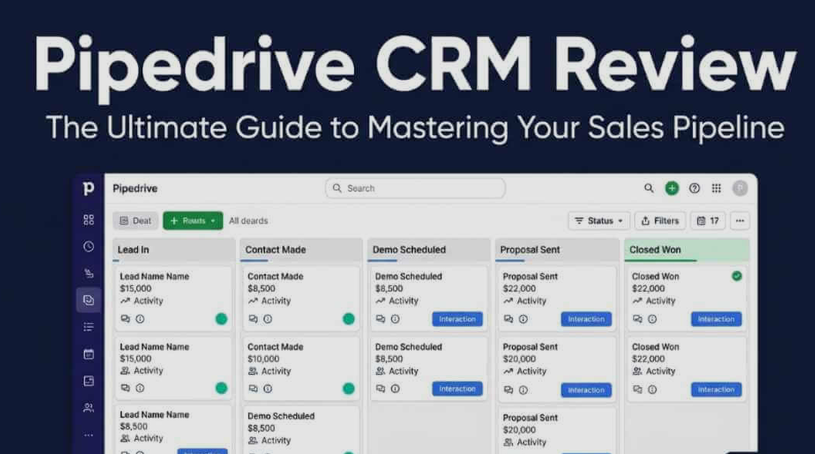
The visual sales pipeline is Pipedrive’s signature feature.
Instead of complicated dashboards, every sales opportunity appears as a card.
Each card can be dragged from one stage to another.
For example:
Lead → Contacted → Qualified → Proposal Sent → Negotiation → Won
Businesses can create unlimited custom pipelines based on their own sales process.
Each pipeline stage can have:
- Probability percentage
- Expected revenue
- Custom fields
- Activities
- Deadlines
Sales managers instantly know where every opportunity stands.
This visual approach makes forecasting much easier.
Lead Management
Pipedrive provides an organized lead management system.
Users can capture leads from:
- Website forms
- Chatbots
- Manual entry
- Imports
- Integrations
Each lead stores:
- Contact information
- Communication history
- Notes
- Files
- Activities
- Emails
- Custom fields
Sales representatives always have complete customer information before making calls.
Contact Management
Managing contacts is incredibly straightforward.
Every customer profile includes:
- Phone numbers
- Email addresses
- Company information
- Previous conversations
- Scheduled meetings
- Notes
- Sales history
- Documents
Duplicate detection helps maintain clean data.
Filtering options allow users to find contacts within seconds.
Email Integration
Pipedrive offers strong email management capabilities.
Users can sync:
- Gmail
- Outlook
- Microsoft Exchange
Features include:
- Email tracking
- Open notifications
- Link tracking
- Templates
- Automatic email logging
- Email scheduling
Every conversation automatically attaches to the correct deal.
This eliminates manual data entry.
Workflow Automation
Automation saves countless hours every week.
Users can automate repetitive tasks such as:
- Creating follow-up activities
- Sending welcome emails
- Assigning new leads
- Moving deals
- Updating fields
- Sending notifications
No coding knowledge is required.
Automation templates make setup easy.
Businesses with complex workflows can create advanced automation sequences.
AI Features
Pipedrive has introduced AI-powered tools that help sales teams work more efficiently.
Some AI capabilities include:
- Email writing assistance
- AI-generated reports
- Sales recommendations
- Opportunity insights
- Smart suggestions
- Pipeline analysis
These features reduce manual work while helping sales teams focus on the highest-priority opportunities.
Activity Management
Successful sales depend on consistent follow-ups.
Pipedrive includes an excellent activity management system.
Users can schedule:
- Calls
- Meetings
- Emails
- Tasks
- Lunch meetings
- Video conferences
The calendar syncs with Google Calendar and Outlook.
Activity reminders ensure that no opportunity is forgotten.
Reporting and Analytics
Pipedrive offers powerful reporting tools.
Businesses can generate reports on:
- Revenue
- Sales performance
- Win rate
- Deal progress
- Conversion rates
- Activities completed
- Sales forecasts
Reports are fully customizable.
Charts and graphs are visually appealing and easy to understand.
Managers can create dashboards for different departments.
Customization Options
Every business has a unique sales process.
Pipedrive allows extensive customization.
Users can modify:
- Sales stages
- Pipelines
- Fields
- Reports
- Dashboards
- Permissions
- Automation
This flexibility allows companies to adapt the CRM instead of changing their workflow.
Mobile Application
Pipedrive’s mobile app is available for Android and iOS.
The app includes:
- Contact management
- Deal updates
- Calendar
- Calls
- Notes
- Email access
- Activity reminders
Sales representatives can update deals immediately after customer meetings.
Offline functionality ensures productivity even without internet access.
Integrations
Pipedrive integrates with hundreds of business applications.
Popular integrations include:
- Google Workspace
- Microsoft 365
- Slack
- Zoom
- Trello
- Asana
- Mailchimp
- Zapier
- QuickBooks
- Xero
These integrations help businesses connect all their existing tools into one workflow.
Security
Customer information is valuable.
Pipedrive includes several security measures:
- Two-factor authentication
- Data encryption
- User permissions
- Activity logs
- Secure cloud hosting
- Automatic backups
Enterprise customers also receive advanced security options.
Customer Support
Support options include:
- Live chat
- Knowledge base
- Video tutorials
- Email support
- Community forum
Higher pricing plans include faster response times and additional support options.
The documentation is detailed enough that many users can solve common issues independently.
Pipedrive Pricing
Pipedrive offers multiple subscription plans designed for businesses of different sizes.
Lite
Ideal for startups and small businesses.
Includes:
- Lead management
- Contact management
- Sales pipelines
- Basic reporting
- AI-powered report creation
- Integrations
Growth
Adds:
- Email synchronization
- Workflow automation
- Meeting scheduler
- Sales forecasting
- Live chat support
Premium
Includes:
- Lead routing
- Advanced AI tools
- Custom scoring
- Company enrichment
- E-signatures
- Enhanced customization
Ultimate
Best for larger organizations.
Includes:
- Advanced security
- Sandbox testing
- Extended support
- Phone support
- Data enrichment
- Additional administrative controls
Pipedrive also offers optional add-ons like LeadBooster for businesses that need enhanced lead capture and qualification tools. Pricing is per user, with discounts available for annual billing.
Advantages of Pipedrive CRM
Extremely Easy to Learn
Most employees become comfortable within hours.
Excellent Visual Pipeline
The drag-and-drop interface makes sales management enjoyable.
Strong Automation
Automation reduces repetitive work.
Fast Performance
Pages load quickly.
Searching is almost instant.
Great Mobile App
Perfect for remote sales teams.
Flexible Customization
Businesses can adapt the CRM to their workflow.
Strong Integrations
Hundreds of available integrations.
Reliable Reporting
Custom dashboards help managers make better decisions.
Disadvantages
Although Pipedrive is excellent, it does have limitations.
Limited Marketing Features
It focuses more on sales than marketing automation.
Businesses looking for complete marketing platforms may need additional software.
Some Features Require Higher Plans
Advanced automation, AI features, and deeper customization are available only in higher-tier subscriptions.
Add-ons Increase Costs
Lead generation tools and certain premium capabilities require separate purchases.
Growing teams should evaluate total subscription costs before committing.
Who Should Use Pipedrive?
Pipedrive is ideal for:
- Small businesses
- Medium-sized businesses
- Sales teams
- Real estate agencies
- Insurance companies
- Financial advisors
- Marketing agencies
- Consultants
- SaaS companies
- Freelancers
Who Should Look Elsewhere?
Pipedrive may not be ideal for:
- Businesses needing advanced marketing automation
- Customer support centers
- Large enterprises requiring extensive customization
- Organizations needing complex ERP features
Pipedrive vs Competitors
Pipedrive vs HubSpot CRM
Pipedrive offers a cleaner sales experience.
HubSpot provides stronger marketing tools.
Pipedrive vs Salesforce
Salesforce offers nearly unlimited customization.
Pipedrive is significantly easier to learn.
Pipedrive vs Zoho CRM
Zoho provides more modules.
Pipedrive delivers a better user experience.
Pipedrive vs Freshsales
Freshsales includes built-in calling and AI.
Pipedrive excels in pipeline visualization and ease of use.
Best Features Summary
Some standout features include:
- Visual sales pipeline
- Drag-and-drop interface
- Workflow automation
- Email synchronization
- Activity reminders
- AI-powered assistance
- Sales forecasting
- Mobile application
- Custom dashboards
- Smart reporting
- Contact management
- Lead tracking
- Calendar synchronization
- Hundreds of integrations
- Easy customization
Is Pipedrive Worth the Money?
For businesses focused primarily on sales, Pipedrive offers excellent value.
Its intuitive interface reduces training time.
Automation improves productivity.
The visual pipeline keeps every opportunity organized.
Managers gain valuable insights through reporting and forecasting.
Although some advanced features require higher subscription plans, the overall experience remains one of the best in the CRM industry for sales-driven organizations.
Final Verdict
Pipedrive CRM stands out as one of the easiest and most effective CRM platforms for businesses that prioritize sales performance. Its visual pipeline, intuitive interface, workflow automation, AI-assisted features, and extensive integrations help teams stay organized and close deals more efficiently.
While it is not designed to replace a full marketing or customer service platform, it excels in its core mission: helping sales professionals manage relationships and move opportunities through the pipeline with minimal friction.